Time for jobs which are not eTime ready will have to be submitted via paper.
# Can I delete a shift? Yes. See[ Deleting a Shift ](https://help.issny.org/books/etime/page/deleting-a-shift "Deleting a Shift")for more information. # Can I enter eTime shifts for my staff? No. Support staff must enter and submit their own time. You cannot submit time on behalf of someone else. The electronic signature on the shift is linked directly to the portal user that is currently logged in. This provides security to the staff, the circle, and ISS, as well as helping to prevent fraud. # Can I make changes to a shift? --- Support staff can make changes to a shift if it is a Draft, or if it has been returned to the staff by the circle or ISS for corrections. A shift cannot be edited after it has been submitted to the circle unless the circle rejects it, which returns it to the staff for corrections. [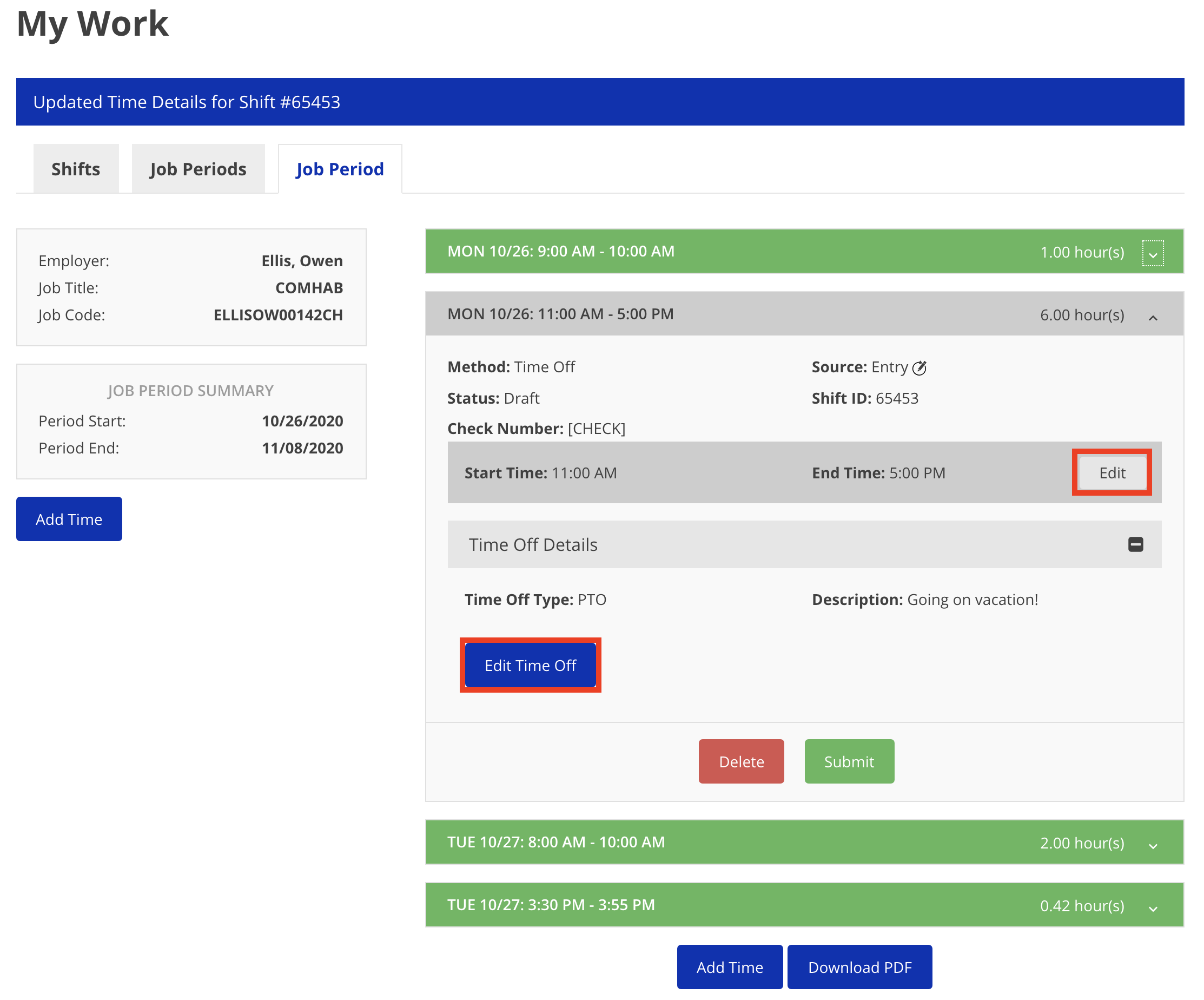](https://help.issny.org/uploads/images/gallery/2020-10/image-1603841372099.png) --- *Disclaimer: All names displayed in the above screen shots are fictional characters. No identification with actual persons (living or dead) is intended or should be inferred.* # Can I save a shift and come back to finish it later? Yes. You can save a shift as a draft and return to it later. To return to it later, staff can click "My Work" in the main menu and they can find it under the "Shifts" Tab. [](https://help.issny.org/uploads/images/gallery/2020-10/image-1603840101886.png) --- *Disclaimer: All names displayed in the above screen shots are fictional characters. No identification with actual persons (living or dead) is intended or should be inferred.* # Can I still submit paper timesheets by mail? Yes. For the time being, paper timesheets submitted by mail are still accepted. # Can I (support staff) assist the participant in approving my time? --- No. # Can I upload mileage reimbursement via eTime? Not at this time. This is a future feature. We’ll update you with further details once this feature is available. # Can staff still upload a scan of a paper timesheet using the Timesheet Upload feature? No.The Timesheet Upload feature will no longer be available as of Friday, June 19, 2020.
# Do I need to request access to eTime? No. Your existing portal login is adequate. If you are support staff, then you will automatically have access to eTime for use with your active jobs. If you are a primary contact, participant, or circle approver, you will automatically have access to approve shifts via your login. # Getting a Proxy Error when trying to approve eTime shifts If an approver gets a proxy error when they are trying to approve eTime shifts, this means that their device is taking too long to talk to our server. This can be caused by many things including a slow or unstable internet connection, the ISS Portal being busy handling many other users also working with shifts, or the eMedNY service that our Portal needs to send our EVV data to being busy. If this happens, please try again in a few minutes. If this happens more than three times in a row, please take a screenshot which includes the full error and the URL in your browser and send an email toAs of midnight 12/6/2020 you must use eTime Live and punch in and out for each shift's start and end. eTime Entry will no longer be an option for dates 12/7 and beyond except for PTO. [Learn more»](https://help.issny.org/books/etime/page/notice-etime-entry-is-going-away)
# How do I fix incorrectly submitted time? --- If a support staff incorrectly submits time, the circle approver should [return the shift to the support staff for corrections.](https://help.issny.org/books/etime/page/reviewing-a-shift "Reviewing a Shift") [See the user story "Making an Adjustment: Forgot to Clock Out".](https://help.issny.org/books/etime/page/example-user-stories "Example User Stories") If the circle approver approves a shift and later realizes this was a mistake, they should contact the ISS Payroll Department as soon as possible. # How do I know if I have time to correct? (Support Staff) You will receive an email notification when a shift has been returned for corrections. Job periods with shifts requiring action will also appear in a list on your portal home page. # How do I know if I have time to review? (Participant & Circle) You will receive an email notification when a new shifts are ready for review. Job periods with shifts pending review will also appear in a list on your portal home page. # How do I know that I have been paid? (Support Staff) To see when and where a shift was paid, click the menu in the top right hand corner and select **My Payment History.** 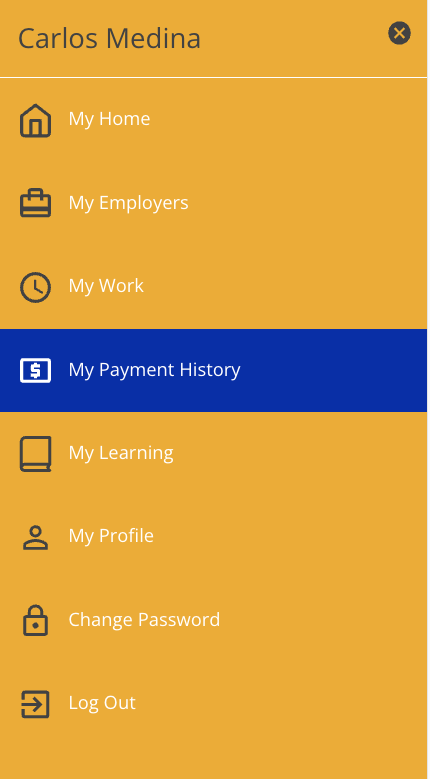 Once clicked, you will be taken to a page displaying all of the shifts that have been paid. To view more details about a check, click on the line containing the check and more details will be displayed. [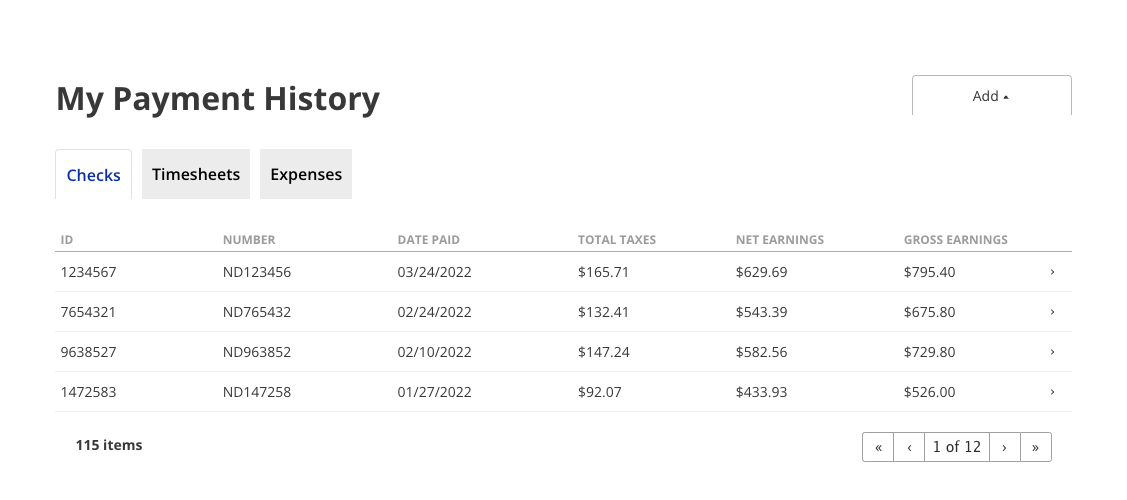](https://help.issny.org/uploads/images/gallery/2023-02/page.png) --- Updated 07/24/23. # How do I submit/enter Time Off/PTO? Please refer to the page [Requesting/Submitting Time Off.](https://help.issny.org/books/etime/page/requestingsubmitting-time-off) # How do PTO, FAPTO, holidays, and other types of Time Off work with EVV? --- EVV has no effect on the various types of Time Off. Since Time Off is not directly billed to Medicaid, it does not need to be electronically verified. # How does Non Face to Face work with EVV? --- A Non Face to Face shift is not EVV Required and staff do not specify a location for the shift. There is therefore no need to verify a location, and consequently, the staff's location is not requested or used at any point. # How is my data stored and transported? --- Your data is both transmitted and stored using commercial grade encryption. ISS complies with all PHI and PII expectations as a Medicaid biller and as a HIPAA covered entity. # How is my location data used? --- The support staff's location data is recorded and used to verify their location at the participant's home when selecting *Home* during a shift. Only the word "HOME" is sent to the New York State Department of Health EVV API. Your specific location information is not passed on to any outside entities or government agencies. # How often do I need to record my time with eTime? If using eTime Live, you should be recording your time as you work. If instead you record your time manually with eTime Entry, you should record your time as close to the time of service as possible.As of midnight 12/6/2020 you must use eTime Live and punch in and out for each shift's start and end. eTime Entry will no longer be an option for dates 12/7 and beyond except for PTO. [Learn more»](https://help.issny.org/books/etime/page/notice-etime-entry-is-going-away)
# I’m having trouble logging in. Help. If you’ve forgotten your password, click the **Forgot your password** link on the login page ([https://portal.issny.org/forgot.php](https://portal.issny.org/forgot.php)) to reset it. If you’ve forgotten your login email, contact ISS atAs of midnight 12/6/2020 you must use eTime Live and punch in and out for each shift's start and end. eTime Entry will no longer be an option for dates 12/7 and beyond except for PTO. [Learn more»](https://help.issny.org/books/etime/page/notice-etime-entry-is-going-away)
# What do I do if one of my staff is unable to enter his/her time into eTime? If the staff is unable to enter their time for some reason, For the time being, they can still record and submit time via a paper timesheet and mail it to ISS. # What do I do if the Circle is unable to review my eTime shifts? If, for some reason, the circle is unable to log in to the portal to review and approve the shifts you submitted, you can print off the job period as a paper timesheet, acquire a physical signature from the circle, and mail it in. In submission of this paper timesheet to the ISS Payroll Department, a statement signed by the supervisor must be included as to why the electronic approval could not be completed. While viewing the job period, click the **Download PDF** button to print out a copy of the eTime shifts as a paper timesheet. [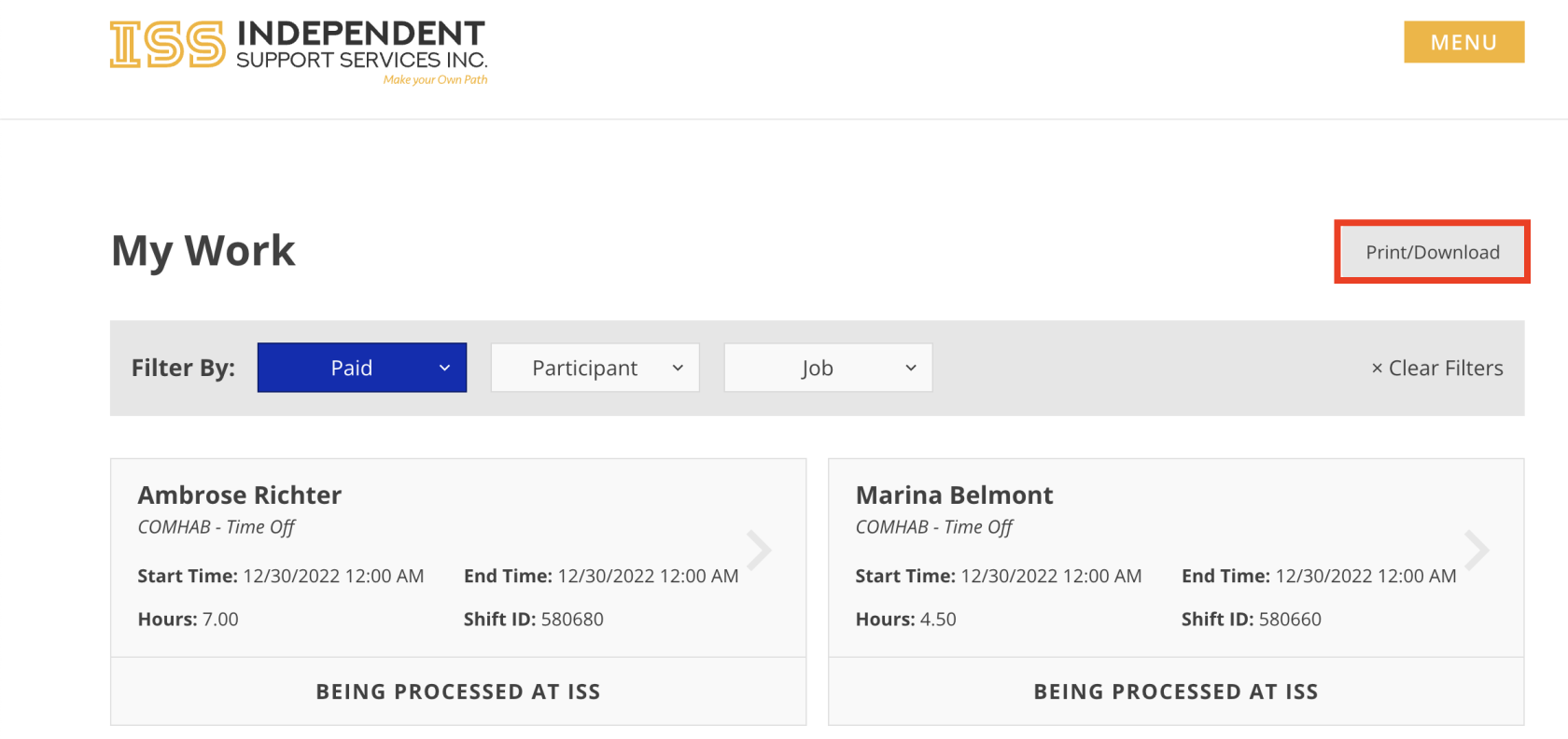](https://help.issny.org/uploads/images/gallery/2023-02/download.png) --- *Disclaimer: All names displayed in the above screen shots are fictional characters. No identification with actual persons (living or dead) is intended or should be inferred.* Updated 07/24/23. # What does it mean if the shift has an EVV Override Request? The *EVV Override Request* that you are seeing is because the staff’s device didn’t think it was at the location that the staff said it was. The distance noted (196 meters in the example screenshot below) is telling you where the staff’s device said it was. Devices often offer up a cached location instead of getting the current location. The ISS Portal cannot force a device to get that current location so we provide you with all the information you need in order to make the determination to approve or reject the shift as you know best where your staff was when they were working. [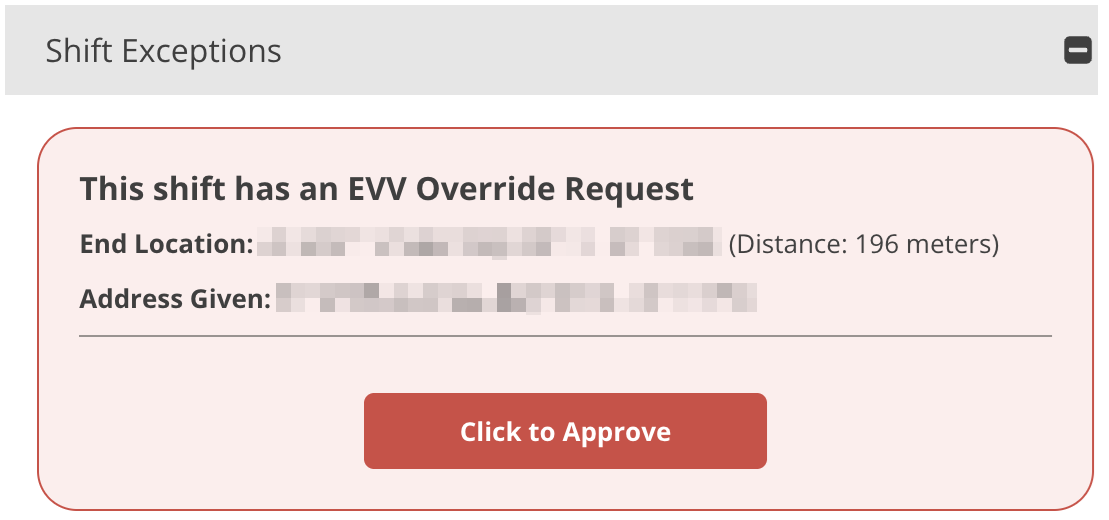](https://help.issny.org/uploads/images/gallery/2025-11/evv-override-request.png) Not sure how to calculate how far away meters are? For an approximate result, multiply the total meters by 3.281. One meter equals 3.28084 feet. --- Created 11/05/25. # What happens if I don’t allow location services? --- If support staff do not allow location services while using eTime Live, their shifts will not be [EVV Verified](https://help.issny.org/books/etime/page/glossary-of-terms "Glossary of Terms"), and will therefore not be billable to Medicaid. Continuous unverified shifts will be a cause for ISS intervention, as ISS may not be able to bill for those shifts. [See Location Services Help for more information.](https://help.issny.org/books/etime/page/location-services-help "Location Services Help") # What if an approver submits a mistake? --- If, after approving a shift for payment, the approver realizes that a mistake has been made, they should contact the ISS Payroll Department. If the shift has not yet been paid, the Payroll Department may be able to send the shift back to staff for correction. If it has been paid, then Payroll will evaluate the necessity of an internal correction and proceed accordingly. # What if I accidentally clock in? Can I delete a shift? --- Yes. Support staff can still [delete a shift](https://help.issny.org/books/etime/page/deleting-a-shift "Deleting a Shift"). Just make sure that you are deleting a legitimately false shift, as there is no way to go back and capture that time and location after it occurs. If you accidentally clock in, simply end the shift and then delete it. See the link above for more information. # What if I (circle approver) don’t agree with time or location information collected and determined by EVV? --- As the staff supervisor, the circle approver bears the responsibility of validating all aspects of the shift. If something looks wrong with the start or end time, or the start or end location, the approver should [return the shift to staff](https://help.issny.org/books/etime/page/reviewing-a-shift "Reviewing a Shift") with a note about the suspected error. The staff can then make a correction and re-submit the shift for review. # What if I forget to clock in or clock out? --- When a mistake is made by forgetting to start or end a shift, take note of when you actually should have started or ended your shift, and then perform that action as soon as you can. In other words, start your shift as soon as you remember, or end your shift as soon as you remember. Once you have completed your shift, you will need to request an adjustment to the start time or end time, depending on which action your forgot. It’s also possible that the location captured at your delayed start or end of shift is inconsistent with the location where you really started or ended the shift. For instance, if you remember to end your shift after you get home, the location may need to be corrected. If that is the case, request an adjustment to the starting or ending location as necessary. [See the user story "I Forgot to Clock In/Clock Out" and "Making an Adjustment: Forgot to Clock Out."](https://help.issny.org/books/etime/page/example-user-stories "Example User Stories") # What if I (support staff) don’t agree with time or location information collected and determined by EVV? --- If you do not agree with the time or location collected or determined by eTime, you can request an EVV Override for start time, end time, start location, and/or end location. [See the user stories "Making an Adjustment."](https://help.issny.org/books/etime/page/example-user-stories "Example User Stories") # What if my time isn't approved by the submission deadline? --- Any shifts not approved by the circle approver by the submission deadline will be pushed to be paid the following pay period. # What if the circle approver doesn’t have a device with which to approve time? --- Please contact your participant’s SD Coordinator to explore options that may be available. # What is the difference between eTime Entry and eTime Live? eTime Entry is the manual entry of each shift. eTime Live provides a more app-like interface, allowing you to “punch” in and out rather than manually typing in dates and times. eTime Live allows you to record your time directly in the portal, in real time.As of midnight 12/6/2020 you must use eTime Live and punch in and out for each shift's start and end. eTime Entry will no longer be an option for dates 12/7 and beyond except for PTO. [Learn more»](https://help.issny.org/books/etime/page/notice-etime-entry-is-going-away "NOTICE: eTime Entry is Going Away")
# What kinds of staff/services can submit time with eTime? Currently, the only services/jobs supported by eTime are ComHab, SEMP (Job Coach and Job Developer), and Respite. Brokerage, IDGS Paid Neighbor, and IDGS Staffing Support are currently not supported by eTime. # When do my shifts need to be submitted and approved to get paid?