Overview
What is eTime?
eTime is a web browser-based method for recording, approving, and submitting time to ISS for payment. It requires the cooperative involvement of a support staff and the participant’s circle of support: the support staff to enter their time and the circle of support review and approve the time, each thereby electronically authenticating the information.
Process
There are four (4) main steps in the eTime process: Recording Time, Reviewing Time, Correcting Time, and Payroll Processing.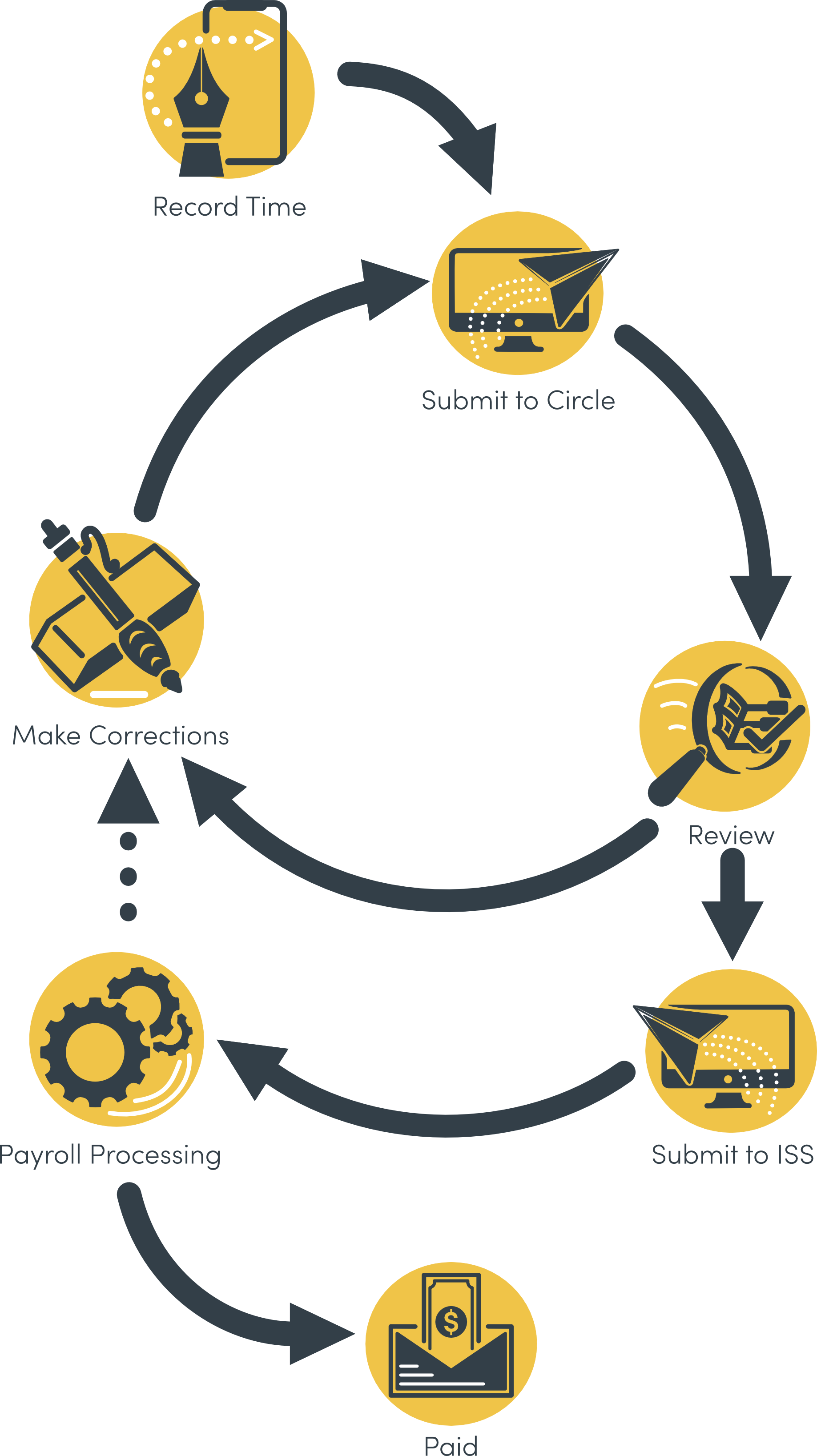
Recording Time
- There are two ways, or sources, with which to record time with eTime: Live and Entry. eTime Live allows you to clock in and out in real time as you work. eTime Entry allows you to record time manually after the fact.
- eTime Live is the preferred source for recording time with eTime.
- For eTime Entry, the support staff records his/her time as close to the time of service as possible.
- After time has been recorded, the support staff will submit it to the circle of support for review and approval.
As of midnight 12/6/2020 you must use eTime Live and punch in and out for each shift's start and end. eTime Entry will no longer be an option for dates 12/7 and beyond except for PTO. Learn more»
Reviewing Time
- Upon submitting the shift for review, each of the following who have a portal login will receive an email notification that there is time to review: participant, primary contact, and any other individual in the circle of support designated as a “web approver”. The previous three groups of individuals are the only ones able to review and approve time.
- The circle will then review each shift, either approving or rejecting each shift. If a shift is rejected, a reason and description must be provided. This reason and description will be displayed to the support staff to make corrections.
- If a shift is rejected, it will be returned to the support staff to make corrections.
If all shifts are approved, it will be marked as approved, and will be automatically submitted to ISS for processing within the next business day.
Correcting Time
- The support staff will receive an email notification if the shift is returned for corrections. They will also receive an email notification if the shift is approved.
- The support staff will log into the portal and select the shift to make corrections. After reviewing the circle comments and making the necessary corrections, they will resubmit the shift for review.
Payroll Processing
- The ISS Payroll department will process submitted time for payment.
- If Payroll identifies an error with a shift, it may be sent back to the staff to make the necessary corrections. The shift will then need to be re-submitted to the circle for approval, and then resubmitted to ISS.
General Requirements
Portal Access
In order to use eTime, support staff must have a portal login. There must also be at least one individual in the participant’s circle of support who has a portal login and is designated a web approver. See the section “Web Approvers” below for more information.
Qualifying Jobs
eTime currently supports all ComHab, Job Coach, Job Developer, and Respite jobs. Paid Neighbor, Staffing Support, and Brokerage are not supported at this time.
Web Approvers
A web approver is any contact associated with a participant who is permitted to review and approve staff time. The participant and primary contact by default are always web approvers. Any other contact can also be designated as a web approver. Contact the participant’s SD Coordinator to add an individual as a web approver.