
*DRAFT* Expense Submission Form - Changes Effective 09/10/24
ISS has made improvements to the Expense Submission Form on our Portal.
The revised Expense Submission Form is more mobile friendly and mobile aware which means that it will look better on both a desktop, laptop, phone, and tablet. It will also work better with your phone or tablet's camera app.

Name and Email
The form will no longer show your name and email address. We know who you are because you logged into our Portal, we don't need to show it as it just takes up space on the form. It is still being gathered and sent along with your submission.
Phone
We have removed this field from the form. It was optional and majority of our users never filled it out. We know how to get in touch with you if we need you.
Expense Type
This is a required field. It is unchanged. We still need you to tell us what type of expense you are submitting: Mileage, Reimbursement, Brokerage, or Vendor Invoice.
Earliest Date on Expense
This is a new required field. We need you to enter the earliest/oldest date of service on your expense submission. It needs to be entered in this format: mm/dd/yyyy. There is a calendar pop-up to help you.
This is step one of us working to incorporate this into our processes so that we can find expenses with dates of service that may be at risk of our billing deadlines.
Supporting Documents
This is a required field.
We have updated the upload functionality to accept images using your mobile device's camera. By doing this, we are able to tell your device's camera what file type and resolution to provide. This means that a photo taken while uploading an expense will not go over our individual file size limitations.
You can now click Add Files multiple times and when you return to the form, the files you previously added for submission will still be there. This includes when you click Add Files and take a picture on your mobile device with your camera app. You can take a picture, add the file, take another picture and add it, and both pictures will be there when you go back to the form.
We will notify you on every file you upload if the individual file is too large, is not an accepted file type, or goes over the max overall submission size.
You can easily click to remove an individual file or all files.
- Allowed file types: gif, heic, jpg, jpeg, pdf, png
- Each individual file cannot exceed: 10 MB
- Each submission cannot exceed: 20 MB
Participant Name
This is a required field. It is unchanged. We still need you to tell us which Participant the expense is for. If you are connected to only one Participant, their name will be pre-filled. If you are connected to multiple Participants, you will have a drop down list to choose from.
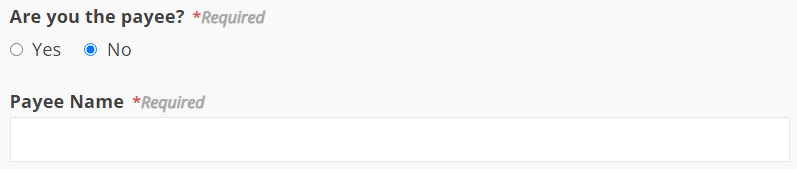
Are you the payee? / Payee Name
This is a required field. It is unchanged. If you are the payee, choose Yes. If you are not, choose No and a new field will be exposed called Payee Name for you to type in who the payee is. For example, if ISS needs to pay your Organization instead of you as an individual, this is where you would enter the name of that Organization.
Comments
This is not a required field. It is unchanged. This is where you would add an optional comment if you needed to.
Updated 09/10/24.