
Glossary of eTime Icons
Types of Icons in Harmonix
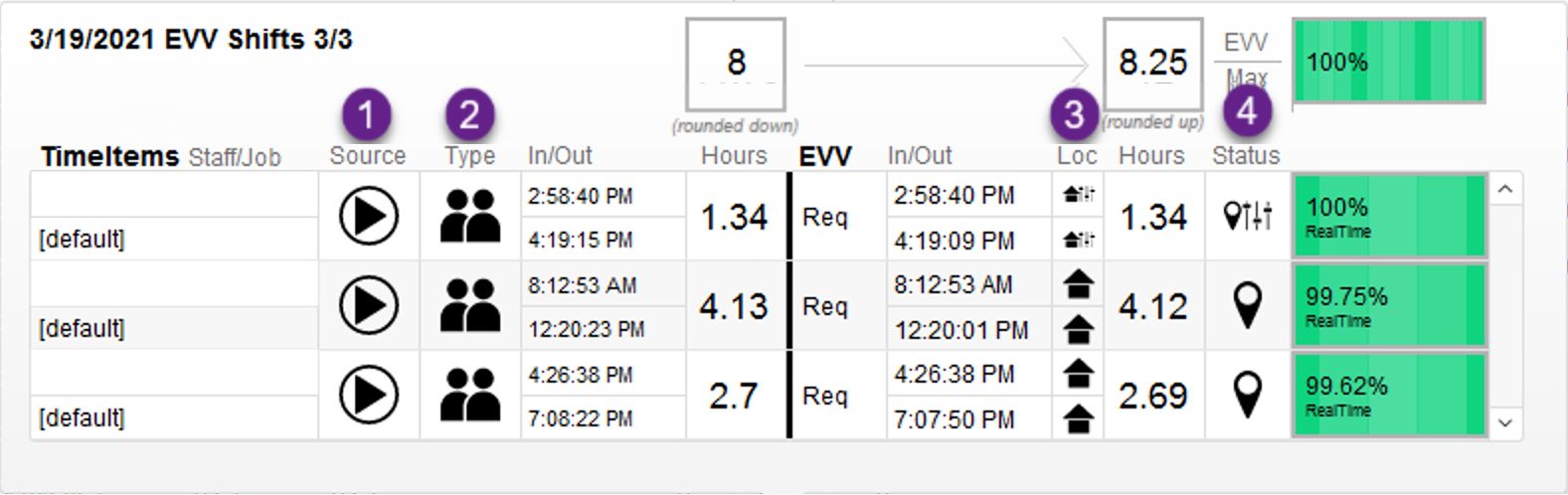
In the diagram above, there are 4 different categories in which icons can fall under. These categories include:
- Source of the Timesheet or how the shift was recorded.
- The type of shift method used.
- The location type that was used for the shift
- The EVV status for the shift as a whole.
Source Icons:
 |
|
 | |
 | |
 | |
|
This icon denotes an EVV Live source was used for the shift in question |
 |
This icon denotes an an Time Entry source was used for the shift in question |
 |
This icon denotes an a Paper Timesheet source |
 |
This icon denotes a Paper Timesheet Upload Source |
Method Icons:
 |
This icon denotes a Face to Face method |
|
This icon denotes a Virtual Face to Face method |
|
This icon denotes a Non-Face to Face method |
|
This icon denotes a PTO method |
Location Icons:
 |
This icon denotes a shift Location taking place at home. |
 |
This icon denotes a shift Location taking place in the community. |
 | |
 | |
 | |
|
This icon denotes that the shift location was |
EVV Shift Status Icons:
 |
This icon denotes that the shift is EVV Verified. |
|
This icon denotes that the shift is EVV Unverified. |
|
This icon denotes that something about the shift was overridden. The shift status is EVV Valid - Override. |