Glossary of eTime Icons


Types
2.png

In


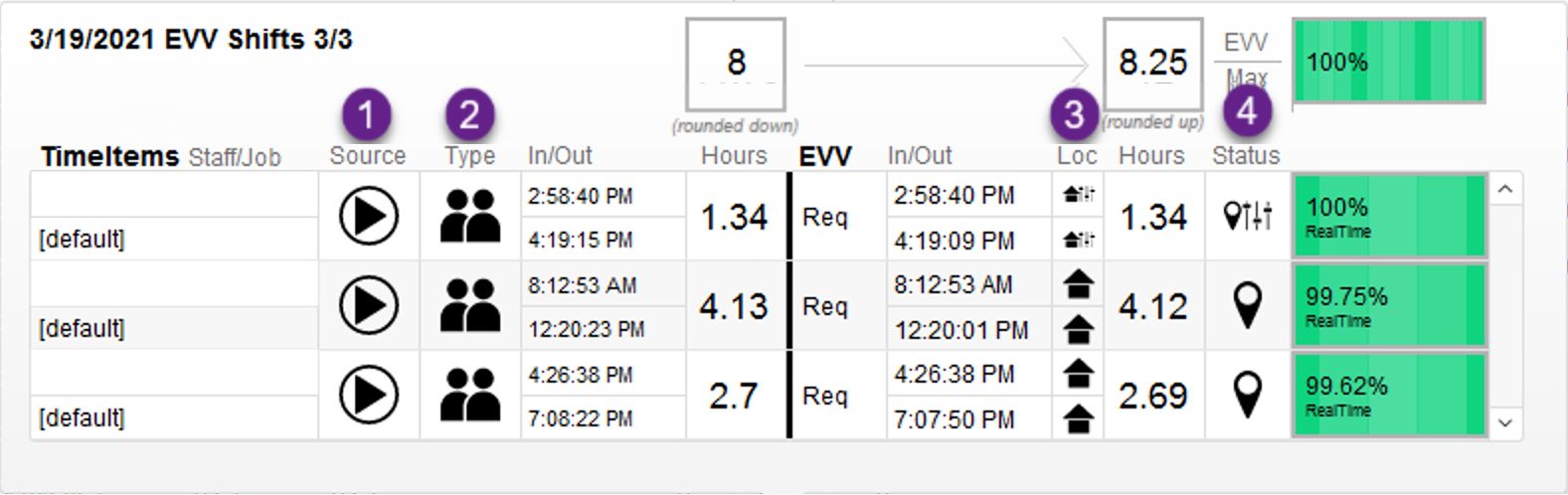
the diagram above, there are 4 different categories in which icons can fall under. These categories include:

  1. Source of the Timesheet or how the shift was recorded.
  2. The type of shift method used.
  3. The location type that was used for the shift
  4. The EVV status for the shift as a whole. 

Source Icons:

EVV Live.pngSource - eTime Live (White).png This icon denotes an EVV Live source was used forIndicates the shift inwas questionrecorded using eTime Live.
eTime Entry.pngeTime Entry (White).png This icon denotes an an Time Entry source was used forIndicates the shift inwas questionrecorded using eTime Entry.
Paper Timesheet.pngSource - Paper Timesheet (W).png ThisIndicates iconthe denotesshift anwas recorded on a Paperpaper Timesheet sourcetimesheet.
Paper Timesheet Upload.pngSource - Paper Timesheet Upload (White).png ThisIndicates iconthe denotesshift awas Paperrecorded and submitted via Timesheet Upload SourceUpload.


Method Icons:

Face to Face.pngMethod - Face to Face (White).png ThisIndicates iconthe denotesshift ais Face to Face methodFace.
Virtual.pngMethod - Virtual Face to Face (White).png ThisIndicates iconthe denotesshift ais Virtual Face to Face methodFace.
Non Face to Face.pngMethod - Non Face to Face (White).png ThisIndicates iconthe denotesshift ais Non-Face to Face methodFace.
PTO1.pngMethod - PTO (White).png ThisIndicates iconthe denotesshift ais PTOTime methodOff.
 

Location Icons:

Location - Home.pngLocation - Home (White).png This icon denotesIndicates a shiftstart/end Locationlocation taking place atof home.
Location - Community.pngLocation - Community (White).png This icon denotesIndicates a shiftstart/end Locationlocation taking place in theof community.
Location Override.pngLocation Override (W).png ThisIndicates icona denotesstart/end thatlocation outside the shiftgeofence, locationbut wasoverridden overridden.to home.


EVV Shift Status Icons:

Location Verified:Valid.pngLocation Verified:Valid (W).png This icon denotes thatIndicates the shift is EVV Verified.
Location Unverified:Invalid.pngLocation Unverified:Invalid (White).png This icon denotes thatIndicates the shift is EVV Unverified.
Geolocation Override.pngGeolocation Override (White).png This icon denotes that something aboutIndicates the shift was overridden. The shift status is EVV Valid - Override.Override, meaning the start and/or end time and/or location was overridden.

Still need help? Email websupport@issny.org.

Proudly providing Fiscal Intermediary services throughout NYS