
Overview
What is eTime?
eTime is a web browser-based method for entering, approving, and submitting time to ISS for payment. It requires the cooperative involvement of a support staff and the participant’s circle of support: the support staff to enter their time and the circle of support review and approve the time, each thereby electronically authenticating the timesheet information.
Process
There are four (4) main steps in the eTime process: Recording Time, Reviewing Time, Correcting Time, and Payroll Processing.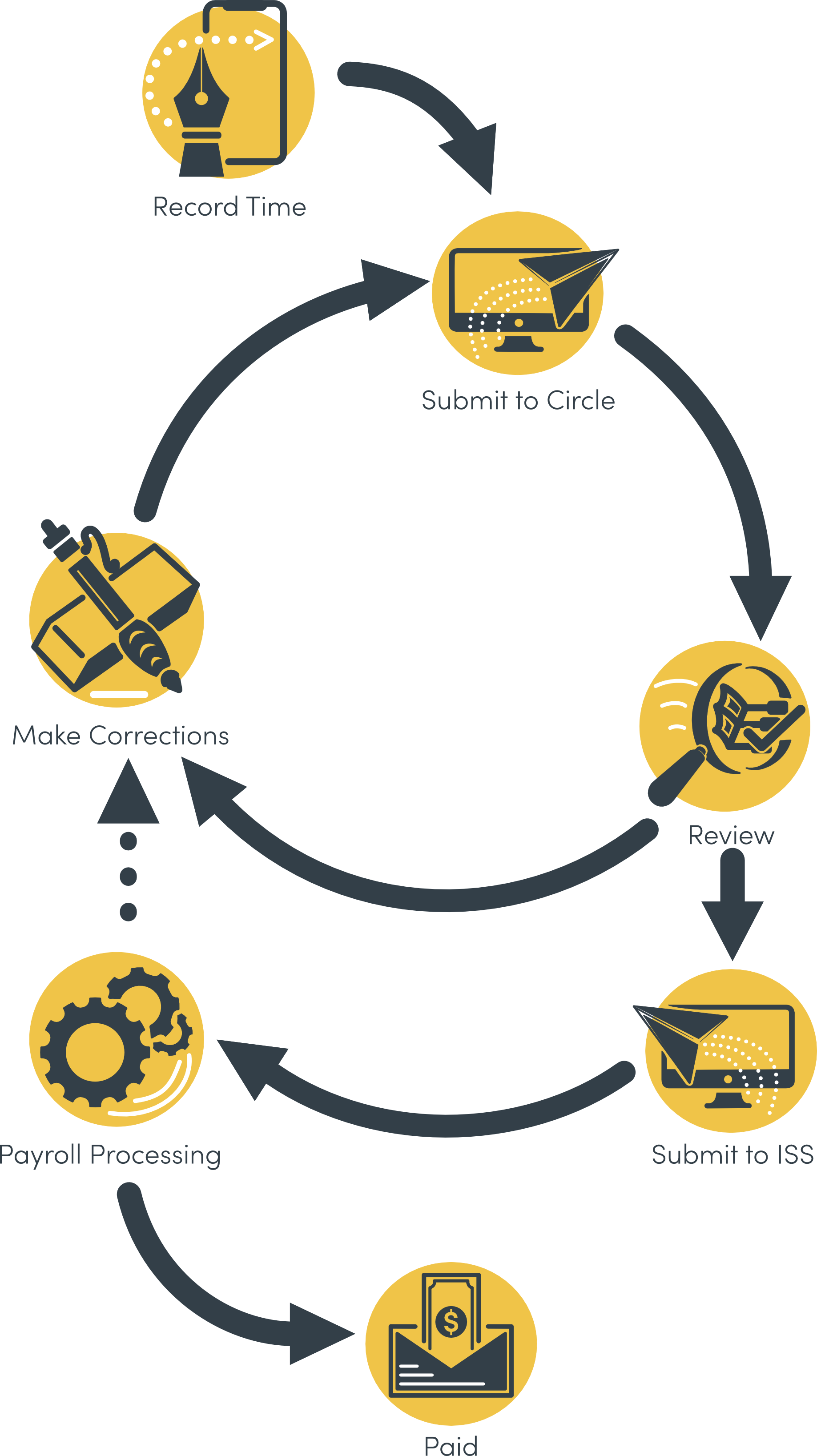
Recording Time
- There are two ways, or sources, with which to record time with eTime: Live and Entry. eTime Live allows you to clock in and out in real time as you work. eTime Entry allows you to record time manually after the fact.
- eTime Live is the preferred source for recording time with eTime.
- For eTime Timesheet Entry, the support staff records his/her time on a paper timesheet at the time of service. This is because Timesheet Entry is the preferred submission model for paper-based timesheets. The originally source document is the paper timesheet.
- After time has been recorded on a paper timesheet, the support staff will log into the portal and enter the timesheet, and then submit it to the circle of support for review and approval.
Reviewing Time
- Upon submitting the
timesheetshift for review, each of the following who have a portal login will receive an email notification that there isa timesheettime to review: participant, primary contact, and any other individual in the circle of support designated as a “web approver”. The previous three groups of individuals are the only ones able to review and approve time. - The circle will then review
theeachtimesheet,shift, either approving or rejecting eachtimesheet line.shift. If alineshift is rejected, a reason and description must be provided. This reason and description will be displayed to the support staff to make corrections. - If
oneaor more lines on the timesheetshift is rejected,the timesheetit will be returned to the support staff to make corrections.
If alllines on the timesheetshifts are approved,the timesheetit will be marked as approved, and will be automatically submitted to ISS for processing within the next business day.
Correcting Time
- The support staff will receive an email notification if the timesheet is returned for corrections. They will also receive an email notification if the timesheet is approved.
- The support staff will log into the portal and select the timesheet to make corrections. After reviewing the circle comments and making the necessary corrections, they will resubmit the timesheet for review.
Payroll Processing
- The ISS Payroll department will process submitted time for payment.
- If Payroll identifies an error with a shift, it may be sent back to the staff to make the necessary corrections. The shift will then need to be re-submitted to the circle for approval, and then resubmitted to ISS.
General Requirements
Portal Access
In order to use eTime, support staff must have a portal login. There must also be at least one individual in the participant’s circle of support who has a portal login and is designated a web approver. See the section “Web Approvers” below for more information.
Qualifying Jobs
eTime currently supports all ComHab, Job Coach, Job Developer, and Respite jobs. Paid Neighbor, Staffing Support, and Brokerage are not supported at this time.
Web Approvers
A web approver is any contact associated with a participant who is permitted to review and approve timesheets.staff time. The participant and primary contact by default are always web approvers. Any other contact can also be designated as a web approver. Contact the participant’s SD Coordinator to add an individual as a web approver.