
Portal Best Practices
We hope the tips below help.
Logging In and Logging Off
The Portal is only accessible through your web browser. Please go to https://portal.issny.org/ on your phonesdevice's web browser to find the login page for the portal.
Visit https://help.issny.org/books/security/page/multi-factor-authentication-f45 for information on Multi-Factor Authentication and One Time Passcodes (OTP).
Tip: We recommend logging into the portal with a new web browser page every time you use it. This will prevent any issues that might occur while having the portal open for too long!
Bookmarks and Favorites
We do not recommend bookmarking any Portal page except for the home page which is https://portal.issny.org/. Make sure you set your bookmark before you log in.
Tip: Although your web browser may only display "portal.issny.org/"org", there may be hidden characters in the web URL (see image below). This can possibly cause a problem with accessing that bookmarked page in the future. Bookmarking the page as instructed above will prevent that issue in the future!
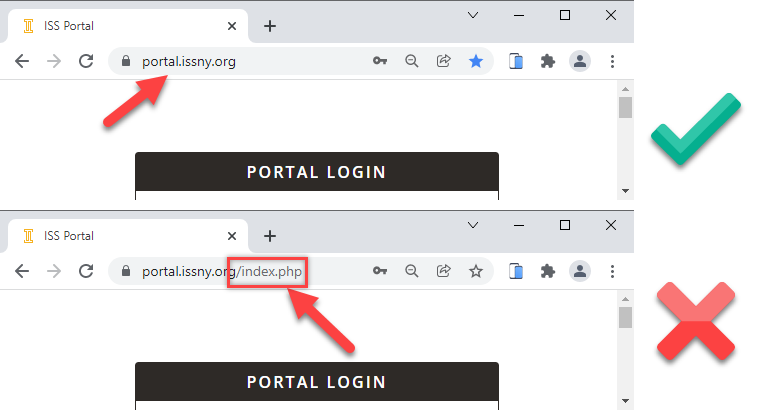
Clearing Cookies, History, and Cache
It is very important to routinely clear the cookies, historyhistory, and cache on your device to avoid running into problems. We recommend that you know how to clear cookies, historyhistory, and cache from the browser you are using.
Here’sHere are the instructions on how to clear cookies from iPhone and Chrome:
iPhones:
https://support.apple.com/en-us/HT201265
Androids
https://support.google.com/chrome/answer/2392709?hl=en&co=GENIE.Platform%3DAndroid
Web Browsers:
https://support.google.com/chrome/answer/95647?p=rl_error&hl=en&visit_id=637729269701255217-2377492424&rd=1
Backup Browser and Device
We recommend that you always have a backup browser and device should you run into problems with one or the other. Plan for this in case your primary browser/device fails.
Tip: Not all web browsers are built the same! Do to this reason, some websites will work better on Chrome verses Mozilla Firefox. It's always best practice to have an alternate web browser to double check if a website is working or if it's your web browser having trouble!
Help Website Link
We recommend you save helpful documents and links, and be sure to bookmark the ISS help website, so it's there when you need it. This is always handy when you need to trouble shoot.
Please see our help website for a complete guide on the Portal and how to submit shifts: https://help.issny.org/books/etime. Be sure to save the links pertaining to your needs.
Still need help?
Always remember to check the help site
Email websupport@issny.org when all else fails. We will answer you within 1 to 2 business days.
If you do decide to leave a voice message, please be aware, we may not get to it right away and you will not receive a call back. All issues and concerns are addressed via email.
If you do email web support be specific in your description with as much detail regarding the problem, issue or concern as possible.
The more detail you provide, the quicker we can respond and assist you in a resolution.