
Item Detail
The exact information displayed in the Item Detail will vary based on the type of item.
There are 6 (six) different types of items:
- Reimbursement Expenses
- Mileage Expenses
- Brokerage (previously Contractor Invoice) Expenses
- Timesheets
- Correction Expenses
- Adjustments (does not have a detail view)
Item Detail View
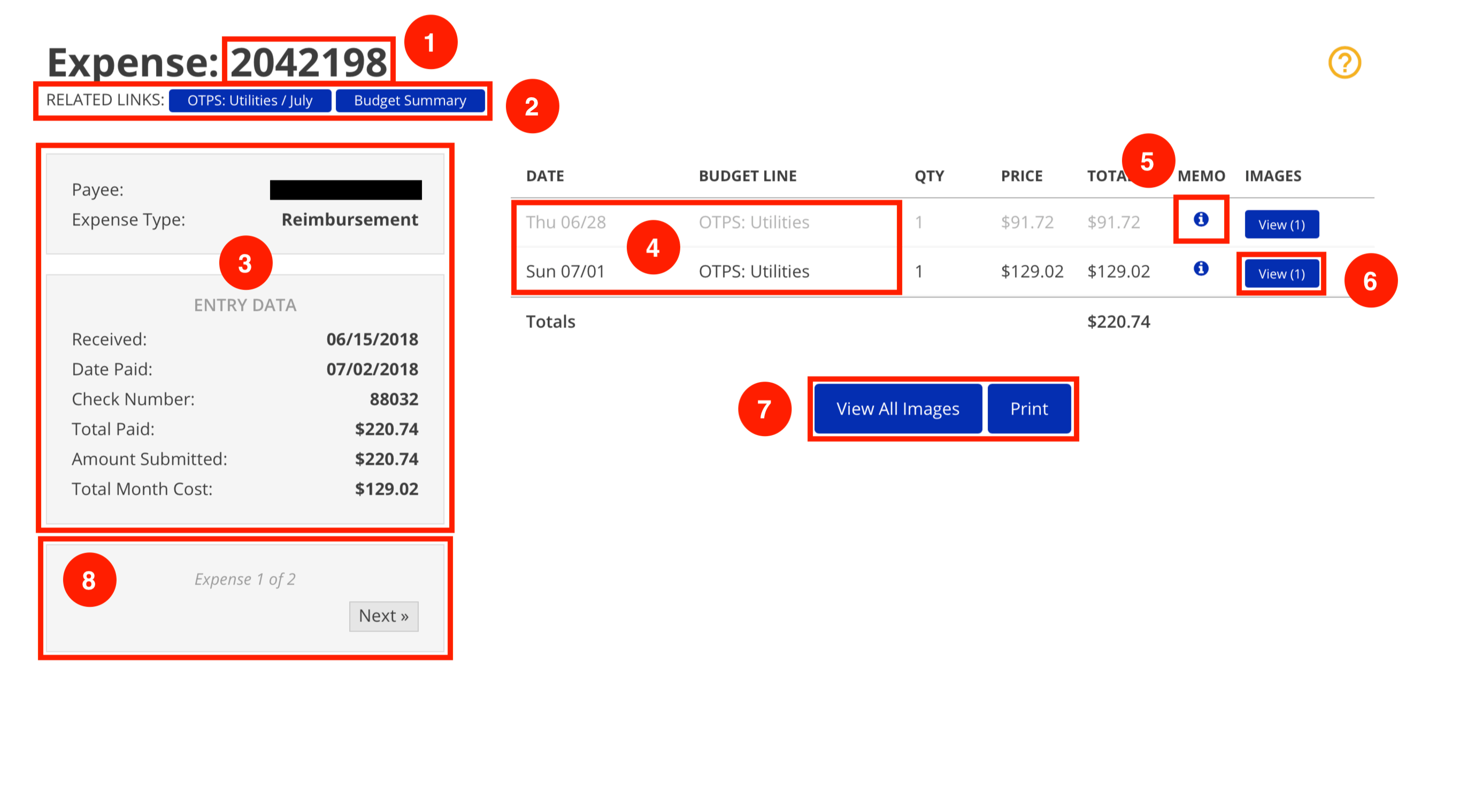
- The ID number of the expense or timesheet is listed at the top.
- Related Links will vary based on the method used to access the Item Detail.
- If accessed via the Budget Discovery method, the related links will include the Budget Summary and the Budget Month used to access the item.
- In the example shown, clicking the first related link (Budget Month link) would take you to the Budget Month view for OTPS: Utilities for July of the applicable fiscal year.
- If accessed via the Index Discovery method, the related links will include a link back to either all timesheets or all expenses, depending on the item type.
- If accessed via the Budget Discovery method, the related links will include the Budget Summary and the Budget Month used to access the item.
- Various summary data about the item is listed on the left. The data listed will
vary depending on the item type. - If accessed via the Budget Discovery method, some lines may appear gray.
Lines that belong to the selected Budget Month are shown in black. All other
lines are shown in gray. - If ISS has added a comment to a line, a memo button will appear on the line.
Click the memo button to read the comment. - If a line has any supporting document(s) (e.g. receipt), a View button will appear on the line. Click this button to view the image(s).
- Click View All Images to view all images associated with the item in a carousel.
- Click Print for a printer-friendly version of the Item Detail page.
- Use the navigation buttons to move between items in the selected Budget Month.
*These navigation buttons do not appear when Item Detail is accessed via the
Index Discovery method.