
Overtime (OT)
How is OT displayed?
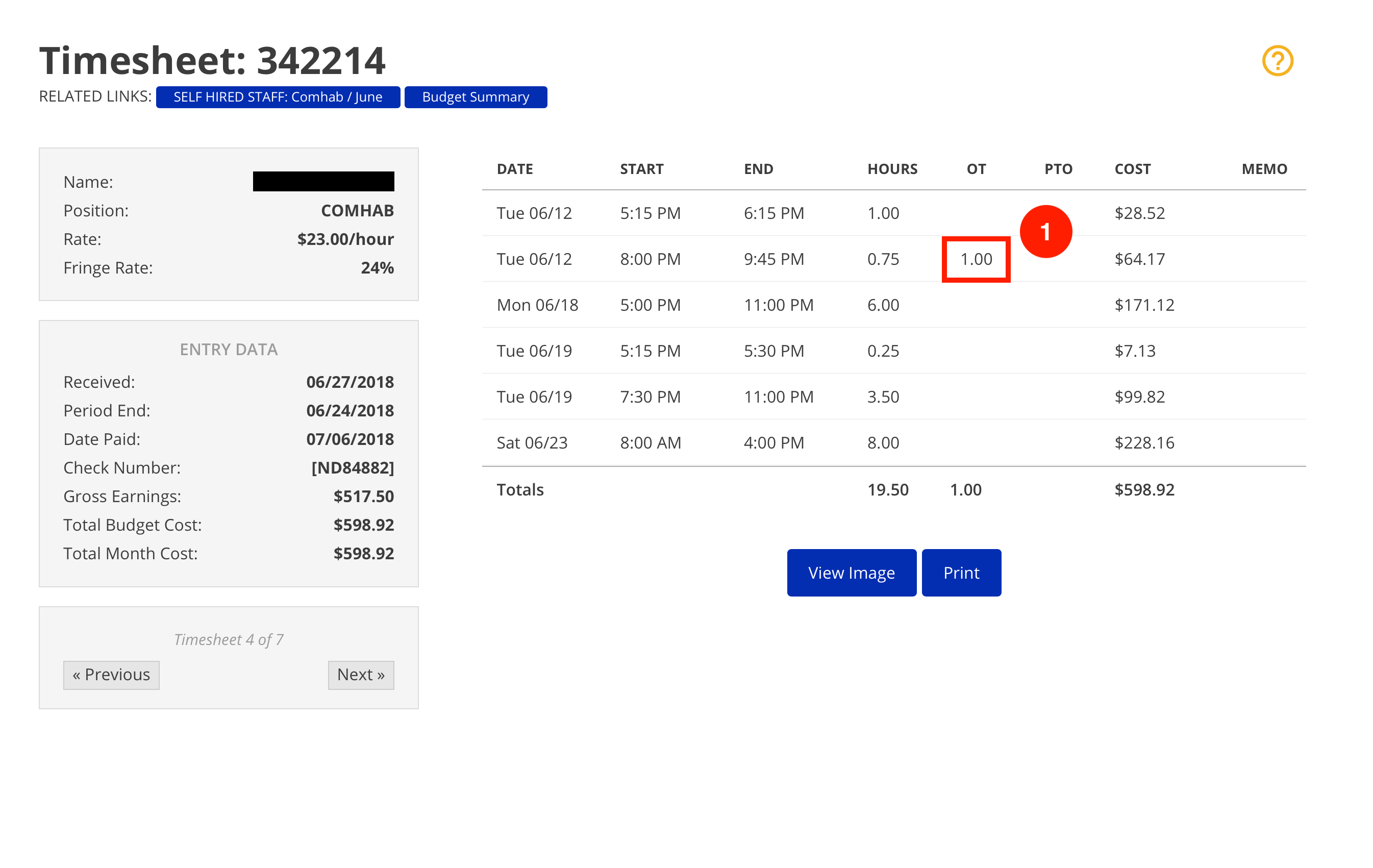
A timesheet containing OT can be identified only on the Item Detail view. A column titled "OT" will appear, with the number of OT hours listed for each line with OT.
How does OT affect the budget?
OT affects the budget just like any other line on a timesheet.
How is OT calculated?
OT hours are paid at time and a half, plus fringe. The formula below shows how the cost for a line with OT is calculated, along with an example using the numbers above.
Cost = [ (Regular Hours)(Rate)(1 + Fringe Rate) ] + [ (OT Hours)(1.5)(Rate)(1 + Fringe Rate) ]
Cost = [ (0.75)(23.00)(1 + 24%) ] + [ (1.00)(1.5)(23.00)(1 + 24%) ]
Cost = [ (0.75)(23.00)(1 + 0.24) ] + [ (1.00)(1.5)(23.00)(1 + 0.24) ]
Cost = [ (17.25)(1.24) ] + [ (34.50)(1.24) ]
Cost = (21.39) + (42.78)
Cost = 64.17